Directory
Developer Zone
Design & Creativity
Productivity
Other Utilities
Others

OmniPlayer
Omniplayer is a powerful local video player that supports almost all mainstream video encoding formats, enabling smooth playback of HD and 4K videos. With a clean and user-friendly interface, it delivers an exceptional viewing experience.
OmniPlayer: All-in-One Media Player for macOS
(Note: This should be replaced with a valid image link for the app icon in actual use)
Current Version: 2.1.10
App Size: 95.3 MB
Supported Systems: macOS 10.13 and above
Languages Supported: Simplified Chinese, Traditional Chinese, English, Japanese, German, French, Spanish, Italian, Portuguese, Russian, Korean
Availability: Free download on the App Store, with in-app purchases for advanced features
Overview
OmniPlayer is a powerful, free all-in-one media player designed specifically for macOS. It goes beyond being just a local video player — it’s a comprehensive media center that addresses users’ needs for playing various file formats, streaming online content, and casting to other devices. Its core strengths lie in native support for a vast array of multimedia formats, smooth playback performance, and convenient smart TV casting functionality.
Core Features & Highlights
1. Nearly Universal Format Compatibility
OmniPlayer’s standout feature is its extensive support for media formats — enabling smooth playback without requiring additional codec packs, eliminating the common “format not supported” issue.
- Video Formats: MKV, MP4, AVI, MOV, WMV, FLV, RMVB, RM, WebM, VOB, etc.
- Audio Formats: MP3, FLAC, APE, WAV, WMA, etc.
- Subtitle Formats: SRT, ASS, SSA, etc.
User Feedback: Many users have highlighted that OmniPlayer successfully plays MKV, VOB, and surround sound audio files that other players (like QuickTime) either fail to play or stutter during playback. Remarkably, it can even smoothly play 4K 60fps videos on older Macs from 2009, demonstrating exceptional performance.
2. Advanced Playback & Control Features
- Precise Playback Control: Pause/resume, fast forward/rewind, jump to specific time points.
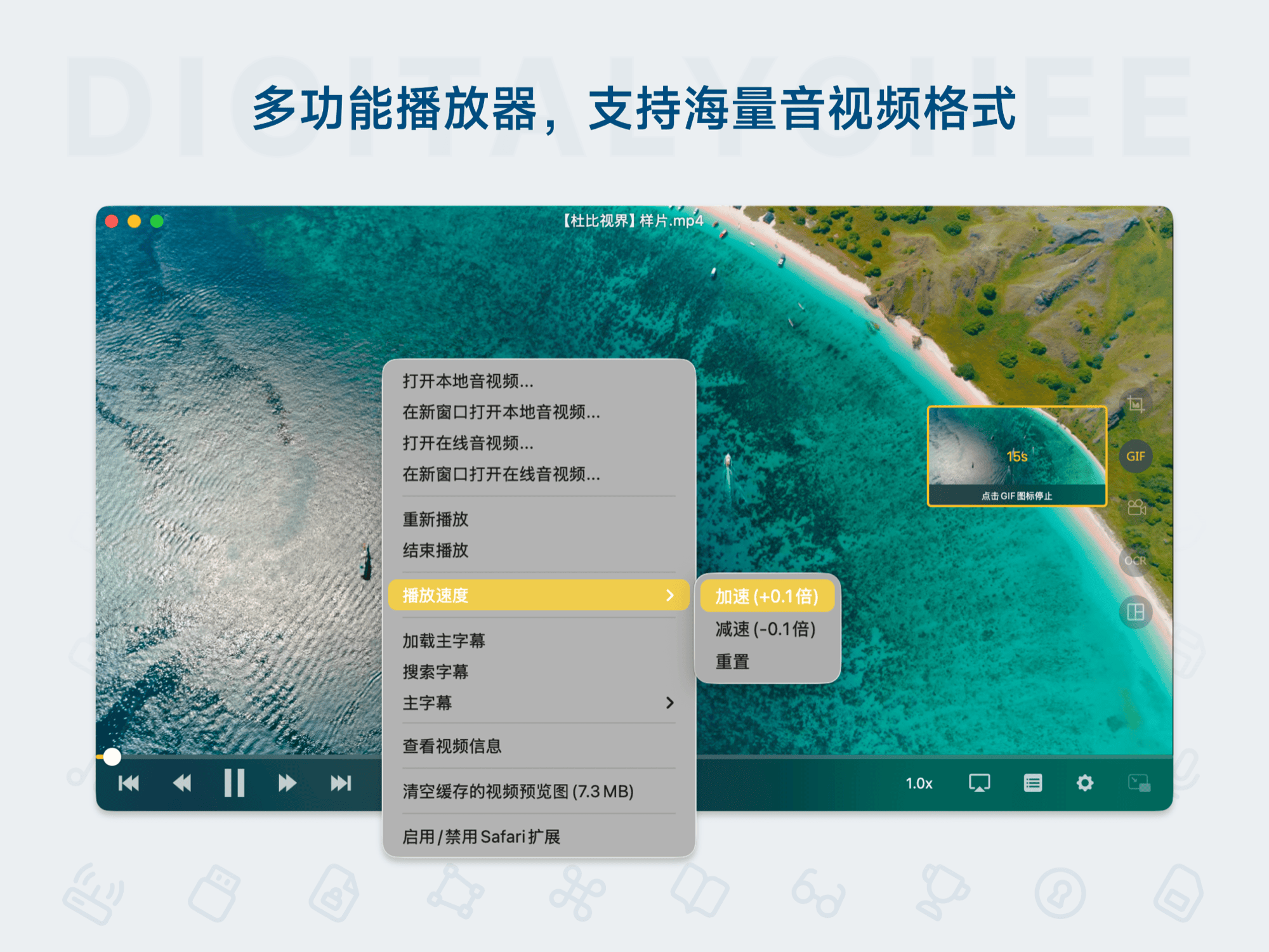
- Flexible Speed Adjustment: Adjust playback speed continuously from 0.1x to 8.0x — ideal for slow learning or quick browsing.
- Frame-by-Frame Playback: Enables detailed analysis of video content.
- Keyboard Shortcuts: Full keyboard support for enhanced efficiency.
3. Intelligent Subtitle System
- Real-Time Loading: Load local subtitle files during playback.
- Online Search: Automatically search and download matching subtitles based on video filename or hash, with multi-language support.
- Full Customization: Real-time adjustment of subtitle color, size, font, and position.
- Encoding Fix: Change subtitle encoding to resolve foreign language subtitle garbling issues.
4. Seamless Casting & Wireless Playback
One of OmniPlayer’s major advantages — effortlessly stream local videos to your TV.
- Wide Protocol Support: Supports DLNA, Chromecast, Roku, and other casting protocols.
- Excellent Device Compatibility: Works with major smart TVs (Samsung, Sony, LG), gaming consoles (Xbox), and TV boxes (Chromecast, Roku Ultra Box, etc.).
- Subtitle Sync Casting: Cast subtitles alongside video to your TV.
- Wireless Convenience: No cables or extra hardware required — wireless streaming made easy.
5. Online Video Playback & Ad Blocking
- Direct Playback: Supports direct playback of video links from platforms like YouTube and Vimeo.
- Ad Blocking: Effectively removes pre-roll ads during playback for a cleaner viewing experience.
6. Content Capture & Sharing
- Video Screenshot: Capture current frames and save in multiple image formats.
- GIF Recording: Record up to 60 seconds of video and export as animated GIFs for sharing moments.
- Thumbnail Export: One-click export of movie file thumbnails for preview.
7. Network Streaming
In addition to local files, OmniPlayer can stream media directly from NAS devices or remote servers via SMB/FTP protocols, helping you build a home media library.
Key Advantages
- Free & Powerful: Basic features are fully free, meeting the daily needs of most users for playback and casting.
- All-in-One Solution: Combines local playback, online video, network streaming, and wireless casting — no need to switch between multiple apps.
- Excellent Compatibility & Performance: Works well on both older hardware and the latest video formats, delivering smooth playback.
- User-Friendly Design: Intuitive interface with professional features like subtitle management and speed control, easy to use.
- Regular Updates & Multilingual Support: Compatible with the latest macOS versions and offers full multilingual interfaces for global users.
In summary, OmniPlayer is the ideal choice for macOS users seeking a hassle-free, feature-rich media player that effortlessly connects to large-screen TVs. Whether you’re watching locally downloaded high-definition movies, streaming online content, or sharing presentations, it provides a reliable and high-quality experience.
All software data on this site is synchronized from the Awesome mac project. Copyright belongs to original authors.
Recommended Apps

Playback
Playback is a lightweight local music player designed for macOS, supporting multiple audio formats. With a clean and user-friendly interface, it focuses on offline music management and playback experience, ideal for music lovers seeking fast, ad-free enjoyment.
Plug
Plug is a sleek and efficient macOS music player that supports Spotify and Apple Music streaming services, offering quick playback controls in the system status bar for effortless management of your music experience.
Popcorn Time
Popcorn Time is a popular open-source streaming application that enables users to watch high-definition movies and TV series for free using P2P technology. It supports cross-platform usage, features an attractive interface, and offers a rich library of content, delivering a cinematic online viewing experience.

PotPlayer X
PotPlayer X is a powerful media player for macOS, supporting almost all mainstream formats, including 4K and Blu-ray video playback. It offers smooth decoding performance and hardware acceleration, making it an ideal alternative for Windows PotPlayer users.

Recordia
Recordia is a macOS menu bar audio recording tool that offers a minimalist one-click recording experience. It supports high-quality WAV format recording, global hotkey operations, and flexible input source selection, making it ideal for quickly capturing inspiration, interviews, lectures, and more. Recorded files can be previewed and edited quickly, with support for custom save locations.
ScreenFlow
ScreenFlow is a powerful tool for macOS that combines high-quality screen recording with professional video editing. It supports recording from iOS devices and multi-source synchronization, and includes a rich library of assets and motion graphics templates, enabling you to easily create professional-grade tutorials and content.
Comments