Directory
Developer Zone
Design & Creativity
Productivity
Other Utilities
Others
CleanClip
CleanClip is a smart clipboard management tool for macOS that automatically cleans up paste text formatting, supports content extraction and conversion, making cross-platform content sharing more efficient and organized.
CleanClip: The Ultimate Intelligent Clipboard Manager for macOS
Overview
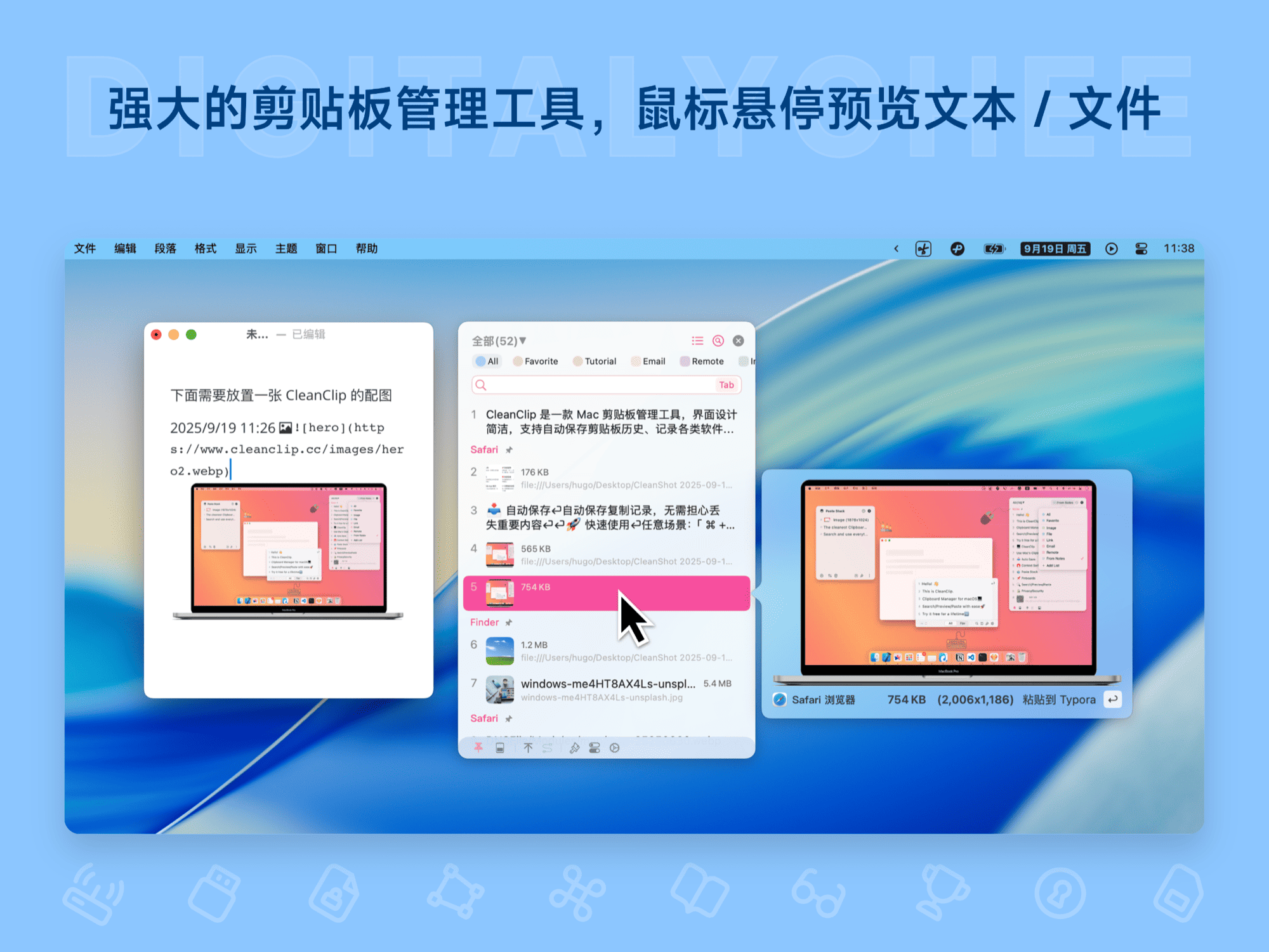
CleanClip is a modern clipboard management tool specifically designed for macOS. It goes beyond simple copy-paste history recording, aiming to completely transform how you interact with clipboard content on your Mac through elegant design, intelligent management, and ultimate keyboard efficiency. Its core philosophy is “No request, no interruption”—it appears only when you need it, seamlessly integrating into your workflow and helping you stay focused.
Core Features
📥 Automatic Saving & Loss Prevention
- Core Protection: Automatically saves every item copied to the clipboard—be it text, images, or rich text formats—so you never lose important content due to accidental overwrites.
🚀 Seamless Keyboard-First Experience
- Instant Access: Use the default
⌘ + ;shortcut to instantly bring up the CleanClip panel from any application. - Direct Number Selection: Once the panel appears, press
0-9to quickly paste the corresponding item—smooth and effortless. - Instant Search: As you start typing letters, the search interface appears automatically, letting you reach your target record with a single keystroke—no mouse required.
🌈 Full Format Support & Application-Specific Templates
- Format Compatibility: Supports plain text, rich text, images, file paths, HTML code, and more.
- App Template Library: Save frequently used templates or snippets for specific applications (e.g., code editors, design software) for one-click reuse.
💡 Intelligent Content Management
- Infinite Favorites: Create dedicated favorites folders for different types of content you reuse often, enabling structured organization.
- Smart Filtering: Offers intelligent filtering by date, source application, content type, tags, and more, bringing order to vast clipboard histories.
🗳️ Revolutionary “Paste Stack”
- Sequential Paste Workflow: When copying and pasting multiple items in order, no longer need to “Copy A → Paste A → Copy B → Paste B.” Instead, copy each item into the “stack,” then perform a single “Paste” action at your target location—CleanClip will automatically output each item in sequence, dramatically boosting efficiency for repetitive text arrangements.
🧲 Front-End App Follow Mode
- Context-Aware Intelligence: Automatically detects and prioritizes clipboard history from the frontmost application you’re currently using. For example, while coding in Xcode, it displays code snippets first; in Photoshop, it prioritizes images or color values—greatly improving selection speed in specific contexts.
⌨️ Quick Menu
- Access the Quick Menu instantly from anywhere using a keyboard shortcut, enabling you to search and use clipboard history in under one second—truly zero mouse interruption.
🌍 Multi-Language Localization
- Supports over ten languages including English, Simplified Chinese, Traditional Chinese, Japanese, Korean, French, German, Spanish, and more, with community-driven translation efforts to serve users worldwide.
Unique Advantages of CleanClip ✨
1. Truly Minimalist UI
“No request, no display” is CleanClip’s design principle.
- Clean by Default: Shows only the latest 5 entries initially to prevent information overload.
- On-Demand Expansion: Expands gracefully to 10 entries per page when you need to view more.
- Invisible Search: The search bar appears only when you start typing—keeping the interface pristine and distraction-free.
2. Ultimate “Zero Context Switching”
- Pops Up Near Cursor: We understand how context switching disrupts your mental flow. CleanClip’s panel intelligently appears near your text input cursor, so your eyes never leave your current work area—maximizing continuity and focus.
3. Thoughtfully Designed Shortcuts
Keyboard-first, but never complicated.
- The team deeply considered every interaction, minimizing required shortcuts and keystrokes while ensuring maximum efficiency. Keyboard logic is intuitive and clear, requiring no learning curve—ready to use immediately.
4. Paste Stack – The Perfect Workflow Assistant
- Specifically designed for ordered text sequences. It completely eliminates the tedious “select → copy → switch → paste” loop, simplifying multi-step operations into just “collect” and “continuous paste.” It’s a productivity multiplier for editing, writing, and form-filling tasks.
Conclusion
CleanClip is more than just a clipboard history tool—it’s an efficiency partner that deeply understands your workflow, eliminates operational friction, and safeguards your state of flow. It hides powerful features beneath an extremely clean interface, leveraging smart context awareness and revolutionary features like the “Paste Stack” to make copy-paste, a simple task,前所未有的 efficient and enjoyable.
All software data on this site is synchronized from the Awesome mac project. Copyright belongs to original authors.
Recommended Apps

ClipMenu
ClipMenu is an efficient macOS clipboard management tool that effortlessly records and quickly accesses clipboard history, supporting multiple formats such as text and images, making copy and paste operations more convenient.

Clipy
Clipy is a powerful and minimalist macOS clipboard history manager. It helps you quickly access all previously copied text, images, and files, supports custom snippets and keyboard shortcuts, making everyday copy-paste tasks more efficient and intelligent.

Copi
Copi is a macOS clipboard enhancement tool that records clipboard history, stores frequently used text snippets, and supports quick access and keyboard shortcuts, significantly improving text processing and work efficiency.

CopyQ
CopyQ is a powerful clipboard manager that supports recording and editing clipboard history, offering multi-clipboard functionality to efficiently manage and batch-use copied text and data, making it an essential tool for improving work efficiency.

CrossPaste
CrossPaste is an open-source cross-device clipboard synchronization tool that supports real-time synchronization of copy-and-paste content across multiple devices running macOS, Windows, iOS, and Android. It requires no account login and automatically discovers devices on the local network, enabling faster and more convenient text and file transfers.

Flycut
Flycut is an elegant macOS clipboard manager that records your copy history, allowing you to quickly access and paste previous clipboard content via simple keyboard shortcuts, significantly improving text processing efficiency.
Comments