Axchange
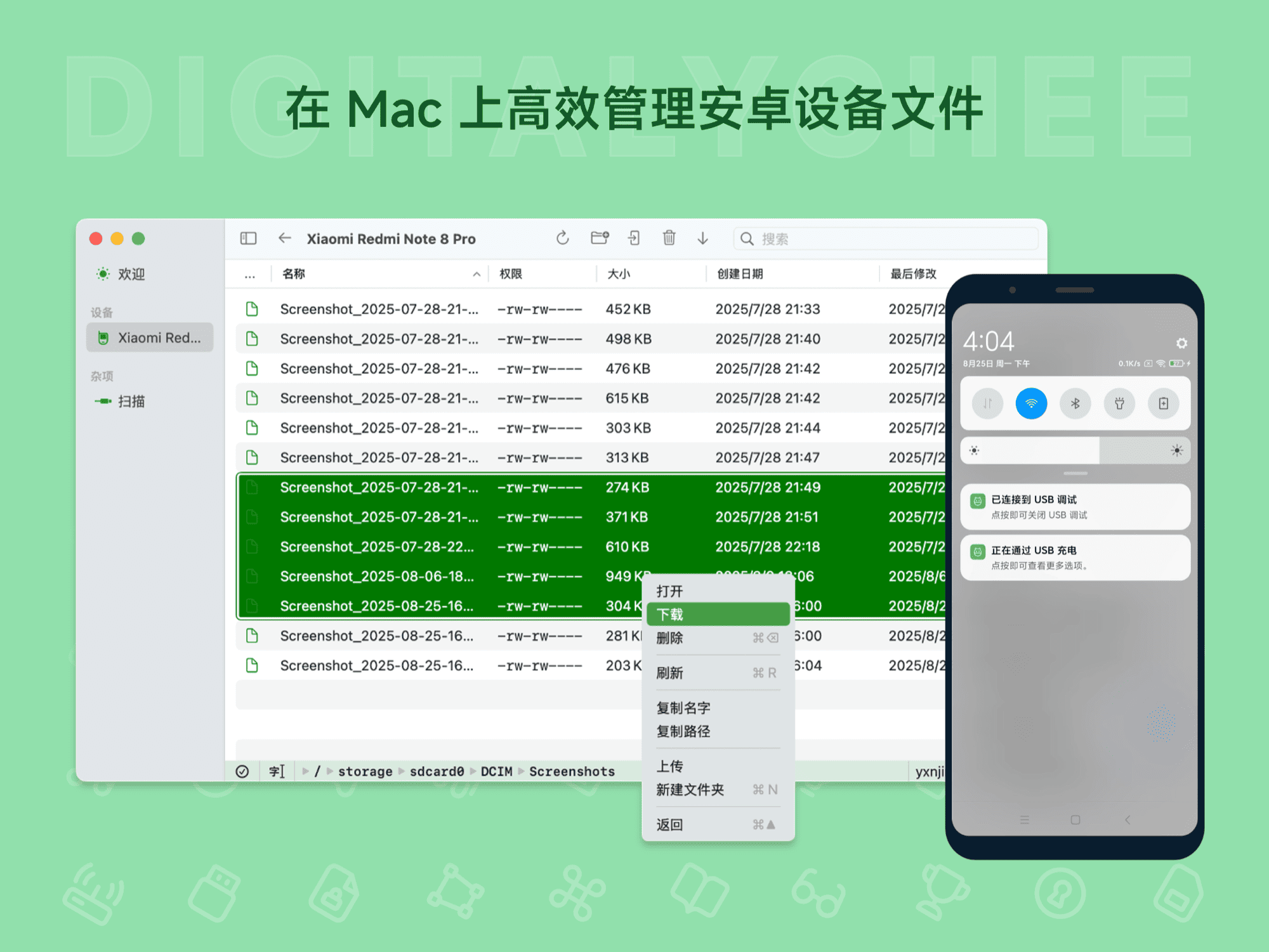
Axchange is an Android file transfer and management tool built for Mac users, utilizing ADB technology for efficient cross-platform file transfer. No additional app installation is required on the phone; simply enable USB debugging to manage device files. Core features include one-click spacebar preview, drag-and-drop file transfer, quick path navigation, and file renaming, with an intuitive interface similar to Finder. It is suitable for daily photo export, workplace collaboration, and developer debugging, significantly improving Android device file management efficiency. It offers permanent activation and free updates.
Prices and billing cycles may contain errors. Please refer to the seller page.
You will be redirected to a third-party platform for transaction.
Core Highlights
- No Phone App Required: Manage various files after enabling USB debugging, no need to install any additional app on your phone.
- Convenient File Preview: Press the Spacebar to preview images, audio, video, and documents, as convenient and easy to use as Finder.
- Drag-and-Drop Upload/Download: Batch upload/download files via drag-and-drop or right-click menu, with real-time transfer progress display.
- Quick Path Navigation: Forget command-line operations; simply edit the address bar to jump to the target path for efficient access to device storage.
- Multiple Management Functions: Supports file renaming, creating new folders, displaying detailed information like file size/permissions, etc.
- Keyboard Shortcuts: Supports various shortcuts for easy operations like Select All/Refresh, Go to Parent Directory, etc.
Detailed Feature Introduction Axchange utilizes a core architecture based on ADB technology, providing a stable and reliable file transfer experience. After running on your Mac, connect your Android device via a USB cable and enable USB Debugging Mode to recognize and manage the device's storage space. Detailed features are as follows:
- Drag-and-Drop File Transfer: Users can directly drag files from their Mac to the Android device, or from the Android device to the Mac, with intuitive and natural operation. A progress bar is displayed in real-time during batch transfers, ensuring clear visibility of the transfer status and significantly improving work efficiency.
- Spacebar Preview: Select any file in the file list and press the Spacebar to quickly preview its content. Supports image, video, audio, and document formats (e.g., PDF, Word), achieving a smooth experience similar to Finder without opening separate applications.
- File Management: Fully supports renaming, moving, deleting files, and creating new folders. Users can view detailed metadata such as file size, modification date, and permissions, helping to precisely manage device storage resources.
- Address Bar Path Jump: Directly input a path (e.g.,
/sdcard/DCIM) into the address bar at the top of the interface to navigate to the target directory with one click, avoiding lengthy folder hierarchy navigation. This is especially useful for quickly accessing specific locations. - Smart Keyboard Shortcuts: Integrates common Mac shortcuts: Command+A to select all files; Command+R to refresh the list; Command+Backspace to go to the parent directory; Command+Delete to permanently delete, etc., enhancing operational efficiency.
Use Cases
- Photography Enthusiasts: Easily view photos and videos from Android devices on a Mac, export them to the computer for editing or backup with one click, freeing up device storage space, and saying goodbye to cumbersome cable transfers.
- Professionals: Quickly transfer office documents, Excel spreadsheets, and PowerPoint presentations. The preview feature facilitates content confirmation, accelerating cross-device collaboration and improving team efficiency.
- Developers for Debugging: Conveniently transfer test files and manage project resources during Android app development. Access the device file system without complex configurations, saving debugging time.
- General Users: Manage music, downloaded files, app caches, etc., simplifying the daily maintenance of Android device content and avoiding operational barriers due to system differences.
Product Advantages & User Experience Axchange is optimized for Mac, featuring a clean and intuitive interface with an operation logic that aligns with Mac user habits. Compared to traditional command-line tools, it offers a more user-friendly graphical interface. Compared to third-party phone apps, it requires absolutely no components to be installed on the Android device, ensuring data security and operational purity. Activate once for permanent use, with a license for 5 devices and a 7-day trial before purchase. The software is delivered automatically; receive the activation code via webpage, SMS, or email. The activation process only requires entering your email and the code, making it simple and fast. Compatible with macOS 14.0 and above, drag-and-drop transfer and Spacebar preview functions perform even better on newer systems. As a popular product in the Digital Lychee x Software Store, Axchange, with its efficient and stable performance, has become an essential tool for Mac users to manage Android devices, completely breaking down cross-platform operational barriers and making file transfer efficient and simple.
Product information is for reference only. Please refer to the purchase page.