CleanClip
CleanClip is a minimalist clipboard manager for Mac, automatically saving clipboard history and supporting text, images, and proprietary formats from professional apps. Its core feature is sequential paste, allowing efficient collection and ordered pasting of multiple lines. With a clean, intuitive interface, quick filtering, favorites list, and floating window operation, it greatly enhances office efficiency, ideal for designers, editors, and researchers to quickly organize information.
Prices and billing cycles may contain errors. Please refer to the seller page.
You will be redirected to a third-party platform for transaction.
CleanClip is a minimalist clipboard management tool designed specifically for macOS users, aiming to solve the pain points of information organization in daily office work. Through intelligent automation features, it makes clipboard history management simple and efficient, especially suitable for scenarios requiring frequent copy-pasting. The core highlight is the unique queue sequential paste mechanism, allowing users to quickly collect multiple lines of text and paste them in a preset order, avoiding repeated window switching and significantly improving work efficiency.
Core Highlights
- Automatic History Saving: Captures all copied content in real-time, never losing important information, including text, images, documents, and private formats from professional software like Final Cut Pro.
- Queue Sequential Paste: Supports splitting and copying multiple lines of text, automatically creating a paste queue, and pasting sequentially, efficiently handling table data and long texts.
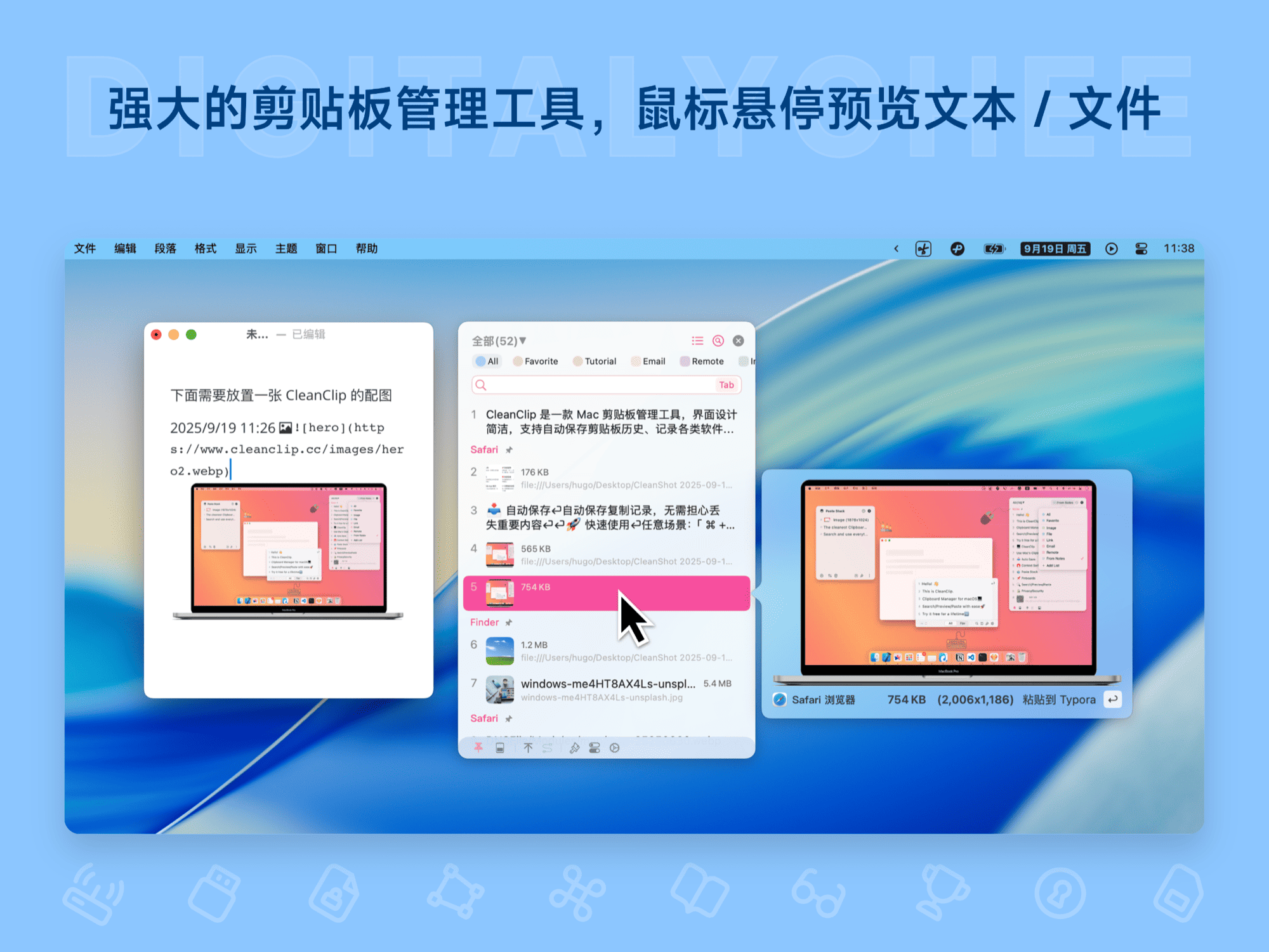
- Minimalist Interface Operation: No redundant design; operations are performed via a floating window, enabling hover preview and quick paste with the Enter key, offering a smooth and intuitive experience.
- Smart Categorization Management: Automatically follows the foreground application, displaying copied content from the current software separately, or switching views via tabs to see history from different applications.
Detailed Features
CleanClip provides comprehensive clipboard management functions. Firstly, it seamlessly records various types of content: from basic text to complex images, documents, and even private formats from Final Cut Pro, ensuring all data is securely stored. Secondly, the software supports powerful filtering capabilities, allowing users to quickly filter history by keywords, source, or content type, such as finding specific projects or sources. The Favorites list feature allows creating dedicated collections for frequently used information (e.g., contacts, formulas) for one-click access. Efficient floating window operation is another major advantage—simply invoke the floating window at the cursor to preview content and paste with the Enter key without leaving the current workflow. Unified paste format settings provide practical options, including all caps, all lowercase, removing all spaces, or extra spaces, ensuring pasted content is neat and uniform. The interface design follows minimalist principles, making all functions clear at a glance and avoiding distractions from user focus. The 30-day pre-purchase trial mechanism allows users to experience it with confidence before deciding to buy.
Applicable Scenarios
CleanClip is suitable for various professional scenarios. Designers can easily access resources across software when collecting images and materials, making the creative process smoother. Copy editors organizing scattered text information can quickly integrate content into documents using the queue paste function, reducing the hassle of repeatedly switching windows. Form fillers can save frequently used information (e.g., addresses, phone numbers) to favorites for one-click form filling, greatly improving data entry speed. Researchers collecting literature snippets and data in bulk can manage them by source category, facilitating thesis writing and citation. Additionally, it is suitable for daily office tasks, such as organizing chat logs, email content, or any scenario requiring efficient information gathering.
Why Choose CleanClip?
Compared to similar tools, CleanClip is known for being lightweight and highly compatible, requiring only 50MB of memory while offering professional-grade features. It supports macOS 10.15 and above, with an iOS version providing a consistent experience. The automatic delivery mechanism ensures immediate receipt of the activation code after purchase, and the 30-day trial period allows users to fully verify its value. The developer continuously provides free permanent updates, fixing issues and optimizing features. Whether for individual users or team collaboration, CleanClip can become an essential tool for boosting efficiency. Experience it now to transform clipboard management from cumbersome to efficient, freeing up more time to focus on core work.
Product information is for reference only. Please refer to the purchase page.