LaunchOS
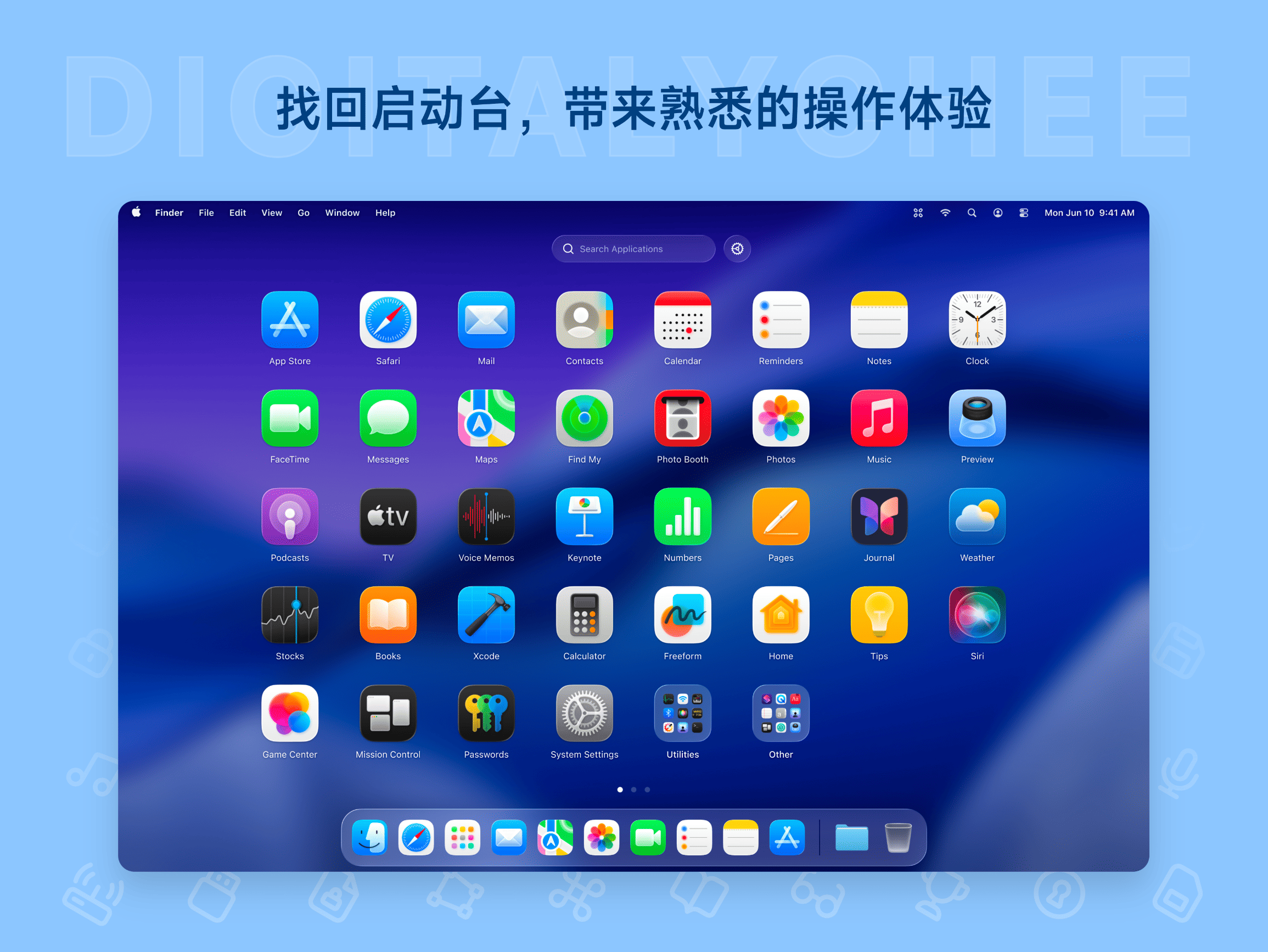
LaunchOS is specifically designed for macOS 26 (Tahoe), perfectly restoring the Launchpad functionality removed by Apple. It supports customizing application names, grid layouts, and application hiding, offering various launching methods such as global hotkeys and hot corners, with an operation as smooth as the native system. Lightweight native development ensures low resource consumption, making it an ideal choice for Mac users seeking to enhance efficiency and personalization.
Prices and billing cycles may contain errors. Please refer to the seller page.
You will be redirected to a third-party platform for transaction.
LaunchOS - The Ultimate Launchpad Replacement for macOS 26
In macOS 26 (Tahoe), Apple removed the long-standing Launchpad feature, causing inconvenience for many Mac users. LaunchOS, a Launchpad replacement tool specifically designed for macOS 26, perfectly restores this core functionality and significantly enhances it.
Key Highlights
- Native Experience: Perfectly adapts to macOS's Liquid Glass effects, providing a deeply integrated operational experience that recovers the familiar Launchpad logic.
- Multiple Launch Methods: Supports various ways to quickly invoke the Launchpad, such as global hotkeys (e.g., Command+Space), Hot Corners (screen corners), and the menu bar, making operations more convenient.
- Enhanced Features: Allows customization of application names and grid layouts, flexible hiding of unwanted apps, and provides rich right-click context menu options, offering more powerful functionality than the original.
- Lightweight & High Performance: Developed with native languages, offering extremely smooth scrolling and zooming operations; has minimal memory footprint, ensuring it doesn't impact system performance and keeps your Mac running smoothly.
Use Cases
- Long-time Mac Users: Accustomed to the efficient operation of Launchpad, LaunchOS preserves familiar usage habits, eliminating the need for relearning.
- Efficiency-Oriented Users: Instantly access the application list via hotkeys or Hot Corners, eliminating the need to browse or search through applications, significantly boosting workflow efficiency.
- Personalization Enthusiasts: Customize application layout and names according to personal preference, hide infrequently used software, and create a personalized Launchpad interface.
- System Optimization Needs: For users seeking a clean and efficient desktop, LaunchOS provides a streamlined launching method, reducing desktop clutter.
Detailed Feature Introduction
The core features of LaunchOS include:
- Restore Launchpad: 1:1 restoration of the Launchpad missing in macOS 26, supporting all native operations.
- Customizable Grid: You can adjust the application grid layout (e.g., 4x4, 5x5, etc.) and set custom names for each application to avoid duplicate app names.
- Application Hiding: Hide unwanted applications with one click, keeping the Launchpad clean.
- Right-Click Menu: Right-click on an application to quickly perform related actions, such as opening settings or adding to the Dock.
- Hot Corner Launch: Set screen corners as trigger points; simply move the mouse to a corner to activate the Launchpad.
- Lifetime Updates: Enjoy free lifetime updates after purchase, ensuring you always have the latest features.
How to Activate
- Download and install LaunchOS.
- After running, click the "Gear" button in the top-left corner to enter Settings.
- Click the "Activate" option and enter your email and activation code to complete activation.
- Enjoy the full functionality.
Why Choose LaunchOS?
- Supports only macOS 26, ensuring optimal compatibility.
- Professional version offers multi-device activation (1/2/5 devices), catering to individual or team needs.
- Trial version with limited features allows testing of the core experience before purchase.
- Officially licensed from the Lizhi Store, safe and reliable, with automatic delivery service.
LaunchOS is the ultimate solution for Mac users facing the missing Launchpad in macOS 26, offering significant improvements in both work efficiency and personalized experience. Try it now and rebuild your Mac workflow!
Product information is for reference only. Please refer to the purchase page.