Sensei
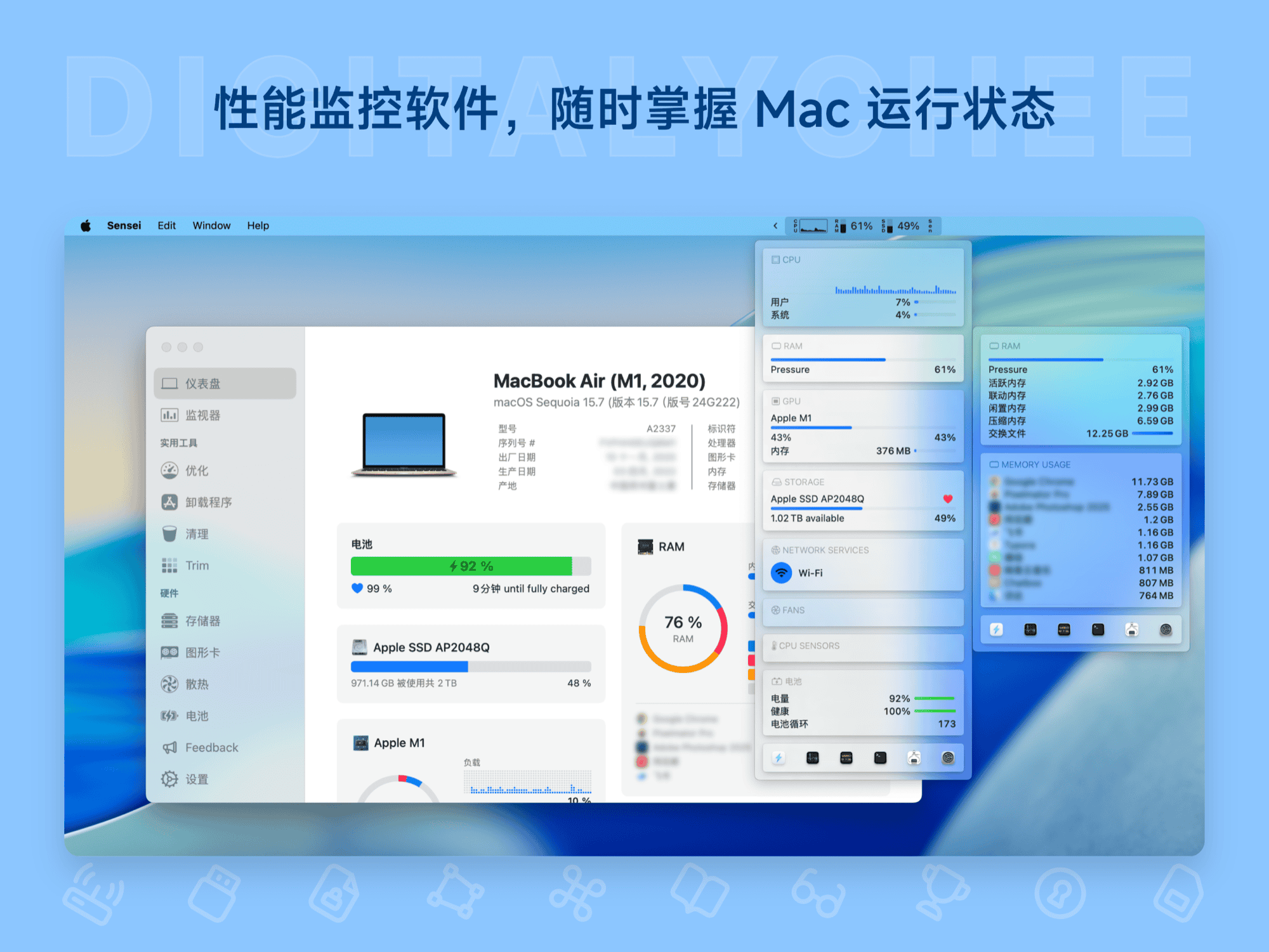
Sensei is a professional Mac system performance monitoring tool that supports real-time display of key metrics like CPU/GPU usage, sensor temperature, and fan speed in the menu bar. It offers personalized appearance settings, advanced dashboard monitoring, application uninstallation, and system cleanup/optimization features, helping users efficiently manage hardware status and ensure stable Mac operation. It supports a 14-day trial before purchase, permanent use, and is compatible with macOS 14 and later versions, designed specifically to enhance system performance and user experience.
Prices and billing cycles may contain errors. Please refer to the seller page.
You will be redirected to a third-party platform for transaction.
Sensei - Mac System Performance Monitoring Tool
Core Highlights
Sensei is a high-performance system monitoring tool crafted for Mac users, integrating real-time status monitoring, system optimization, and data cleaning into one, providing an intuitive and comprehensive hardware management experience. Its core advantages are:
- Real-time Menu Bar Monitoring: Lightweight design, automatically displays key data such as CPU usage, GPU current, sensor temperatures, and fan speeds in the menu bar. Say goodbye to cumbersome operations and keep track of your system's health at any time.
- Deep Personalization: Supports free adjustment of the status monitor's appearance, including module partitioning, combined display modes, large/small corner radius styles, etc., meeting the aesthetic needs and work scenarios of different users.
- All-in-One Advanced Dashboard: Integrates key information like battery health, disk space, device model, uptime, etc., providing a clear and easy-to-read comprehensive view, eliminating the hassle of switching between multiple tools.
- Efficient System Optimization: Intelligently manages application login items, launch agents, and daemons. Disable redundant background tasks with one click, significantly improving multitasking efficiency and reducing system lag.
- Smart Cleaning Function: Safely scans for useless files, system logs, and cache data, freeing up disk space, and keeping the system running smoothly without manual intervention.
Detailed Feature Introduction
Real-time Performance Monitoring
Displays hardware status in real-time in the menu bar, including CPU and GPU usage, memory usage, disk read/write speeds, sensor temperatures (e.g., CPU/GPU temperature), and fan speeds. All data is updated at a high frequency of 1 second, ensuring you can promptly identify overheating or performance bottlenecks during high-load scenarios (like video rendering, gaming), preventing hardware damage.
Personalized Appearance Settings
Through the built-in customization interface, users can freely configure status display modules: choose combinations of parameters like temperature, fan speed, disk space; adjust corner radius (from small to none); set different color themes. This feature is especially suitable for content creators and designers, allowing them to monitor system performance while maintaining a beautiful workspace.
Advanced Dashboard & Hardware Statistics
Sensei provides a detailed advanced dashboard, unifying the display of:
- Battery health and remaining runtime
- CPU/GPU usage and temperature charts
- Disk space usage details and device model information
- Memory usage trend analysis Additionally, built-in hardware information statistics allow quick viewing of hardware specifications like motherboard, graphics card, storage devices, etc., facilitating system diagnostics and upgrade decisions.
System Optimization & Cleaning
- Startup Item Management: Clearly lists all application login items, launch agents, and daemons, supports one-click disabling or deletion, reducing boot time and background resource consumption.
- Deep Disk Cleaning: Intelligently scans for useless files like system caches, log files, temporary data, etc., safely deletes them to free up space while preserving important data. The cleaning process is efficient and zero-risk, with no worry about accidentally deleting critical files.
- Application Complete Uninstallation: Deep cleans all residual files of third-party applications, including configuration files, extension plugins, etc., preventing leftover clutter from occupying space after uninstallation.
- Disk Performance Testing & Optimization: Provides benchmarking functions to evaluate disk read/write speeds; supports Trim optimization and health diagnostics, extending SSD lifespan and ensuring stable and efficient storage system performance.
Applicable Scenarios
High-Energy Work Monitoring
Content creators (e.g., video editing, 3D modeling) can monitor real-time temperatures and fan speeds while running large software to prevent overheating, ensuring CPU/GPU operate at optimal levels, avoiding project interruptions or hardware damage.
Multitasking Office Speed Boost
Business professionals handling collaborative tasks across multiple applications (e.g., email, documents, meeting software running simultaneously) can close redundant login items and background processes with one click, reducing lag and improving work efficiency, especially suitable for long-term, high-intensity office scenarios.
Disk Space Management
For Macs with insufficient disk space, Sensei's cleaning function can quickly identify cache files and redundant materials, freeing up space for more work files (e.g., design assets, project documents), particularly suitable for daily maintenance by creative professionals.
System Health Maintenance
Regular users can continuously monitor system status to promptly detect performance degradation or anomalies (e.g., temperature spikes), preventing hardware failures in advance and extending Mac lifespan. Additionally, the 14-day pre-purchase trial allows users to fully test the tool before buying, ensuring it matches personal needs.
Product Advantages
- Compatibility: Optimized specifically for macOS 14 and later, perfectly compatible with Apple Silicon chips and Intel platforms.
- Reliability: Officially licensed activation codes, support activation on 3 devices, permanent usage rights, free minor version updates.
- Ease of Use: Chinese interface language, 4-step activation process (run software > click Activate License > enter email and activation code > complete activation), no complex configuration needed.
- Value-Added Service: After purchase, receive points equal to 100% of the payment amount, redeemable for limited-time benefits, truly achieving high cost-effectiveness.
Sensei is not just a performance monitoring tool but also an intelligent housekeeper for the Mac system. Through scientific management, it helps users keep their devices running efficiently, especially suitable for professionals and power users who pursue performance stability and system cleanliness.
Product information is for reference only. Please refer to the purchase page.