WGestures 2 - Global Mouse Gesture Software
WGestures 2 is a global mouse gesture software for macOS and Windows that simplifies mouse operations to trigger complex commands, significantly boosting work efficiency. Supports multiple trigger methods, gesture recording, and script extensions, allowing customization of trajectories and action parameters. Flexible on/off switching prevents conflicts, making it ideal for web navigation and office tasks, enabling smarter and more efficient mouse operations.
Prices and billing cycles may contain errors. Please refer to the seller page.
You will be redirected to a third-party platform for transaction.
WGestures 2 is a global mouse gesture software designed to enhance work efficiency, compatible with macOS and Windows systems. It simplifies mouse operations to trigger complex commands with a single gesture, significantly optimizing the daily user experience.
Core Highlights
- Comprehensive Gesture Triggers: Supports various trigger methods including mouse middle button, right button, side buttons, scroll wheel, and screen corners, catering to different operating habits. Enables efficient interaction without relying on specific hardware.
- Modifier Key Expansion: Can combine with keyboard keys like Ctrl, Alt, and Shift, allowing a single gesture to trigger multiple actions. Greatly enhances customization flexibility, e.g., executing window switching and paste operations simultaneously.
- Gesture Recording & Editing: Allows real-time trajectory recording when creating gestures, with playback, editing, search, and drag-and-drop copy functions. Ensures precise adjustment of action paths and avoids accidental triggers.
- Deep Script & Command Integration: Supports running programs, simulating keystrokes, window control, and executing AppleScript, Cmd, and Lua scripts. Enables highly customizable system-level operations with strong extensibility.
- Windows-Exclusive Custom Menu: Integrates a set of actions into a menu item, saving on the number of gestures and improving execution efficiency. Especially suitable for scenarios requiring frequent execution of multi-step tasks.
- Flexible Toggle Management: Enables/disables gestures for specific software, or sets start-up timeouts to bypass conflicts. Effectively avoids operational conflicts and ensures stable operation across various applications.
Use Cases
- Web Navigation Optimization: Quickly switch tabs, go forward/back, or refresh pages in browsers, improving browsing efficiency. Especially suitable for users who frequently switch web pages (e.g., content creators, researchers).
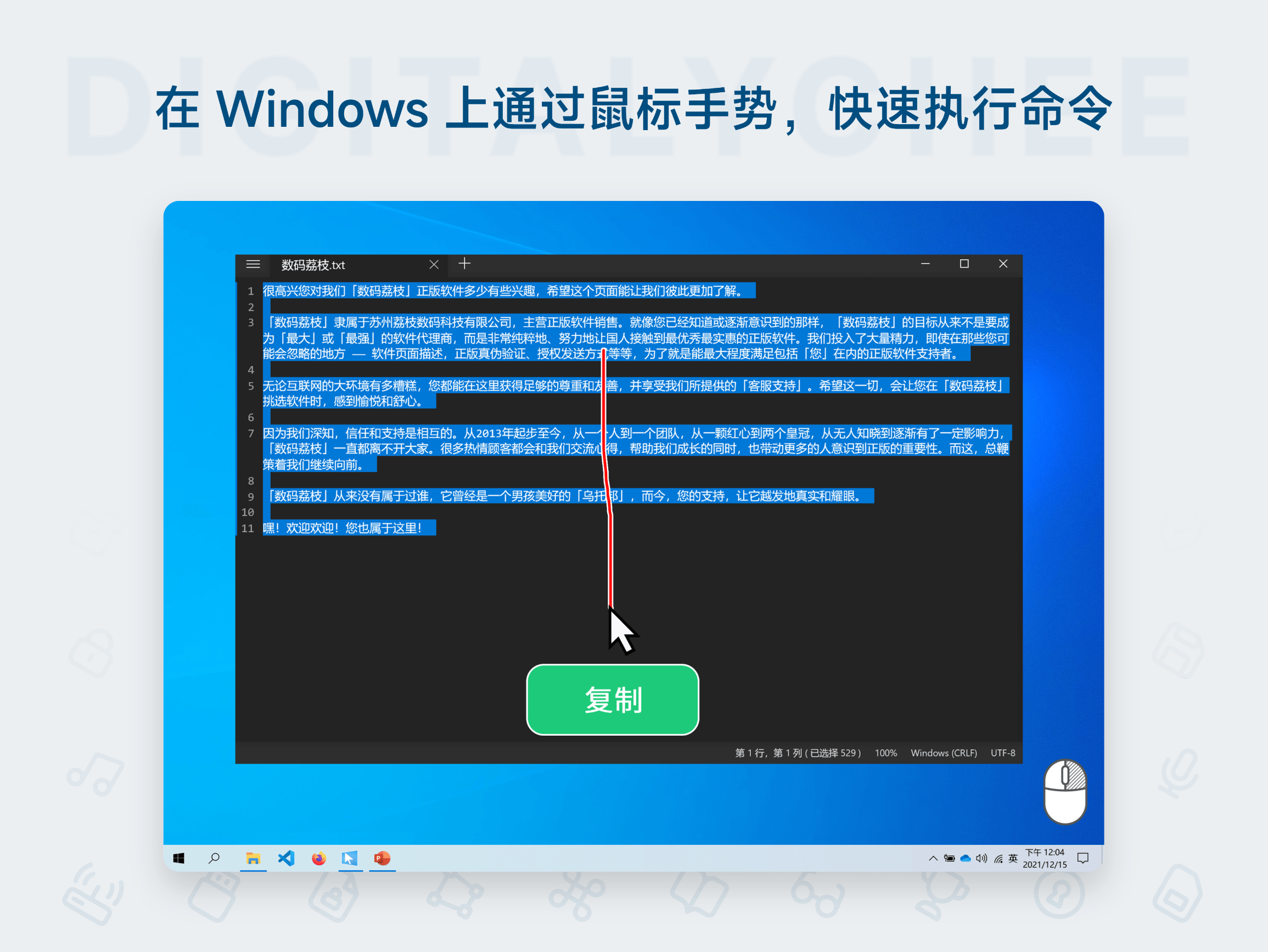
- Common Operation Binding: Converts software shortcuts (e.g., Save, Copy, Print) into mouse gestures. Eliminates the need to memorize complex key combinations; gestures automatically switch per program, reducing mouse movement time.
- Task Flow Automation: Triggers complex operations like launching multiple programs, file categorization, or data organization with one click. For example, simultaneously opening the Office suite and sorting documents, accelerating workplace workflows.
- Gaming Assistance: Presets operation sequences in compatible software to achieve quick character switching or skill casting, improving in-game response speed.
Important Notes
- This software requires an external mouse (touchpad not supported). Some advanced functions require the mouse middle button or side buttons to trigger. It is recommended to try the free version first to evaluate its effectiveness.
- The custom menu function is exclusive to the Windows platform. macOS users can achieve similar effects through other gesture management methods.
- A limited-feature trial version is available for download to ensure satisfaction before purchase.
Activation & Usage After purchase, the software is automatically delivered to your email/webpage. Install the software, click "About," and enter the activation code to unlock all features. Supports activation on 4 devices, provides permanent usage rights, and includes free minor version updates to ensure you receive the latest optimizations long-term.
WGestures 2 targets users including professionals, developers, content creators, etc. By replacing traditional operations with intelligent gestures, it significantly reduces hand fatigue and operation time, making it an essential tool for boosting productivity. From daily office work to professional tasks, let your mouse become your efficient assistant and unlock your efficiency potential!
Product information is for reference only. Please refer to the purchase page.