Directory
Developer Zone
Design & Creativity
Productivity
Other Utilities
Others

PopClip
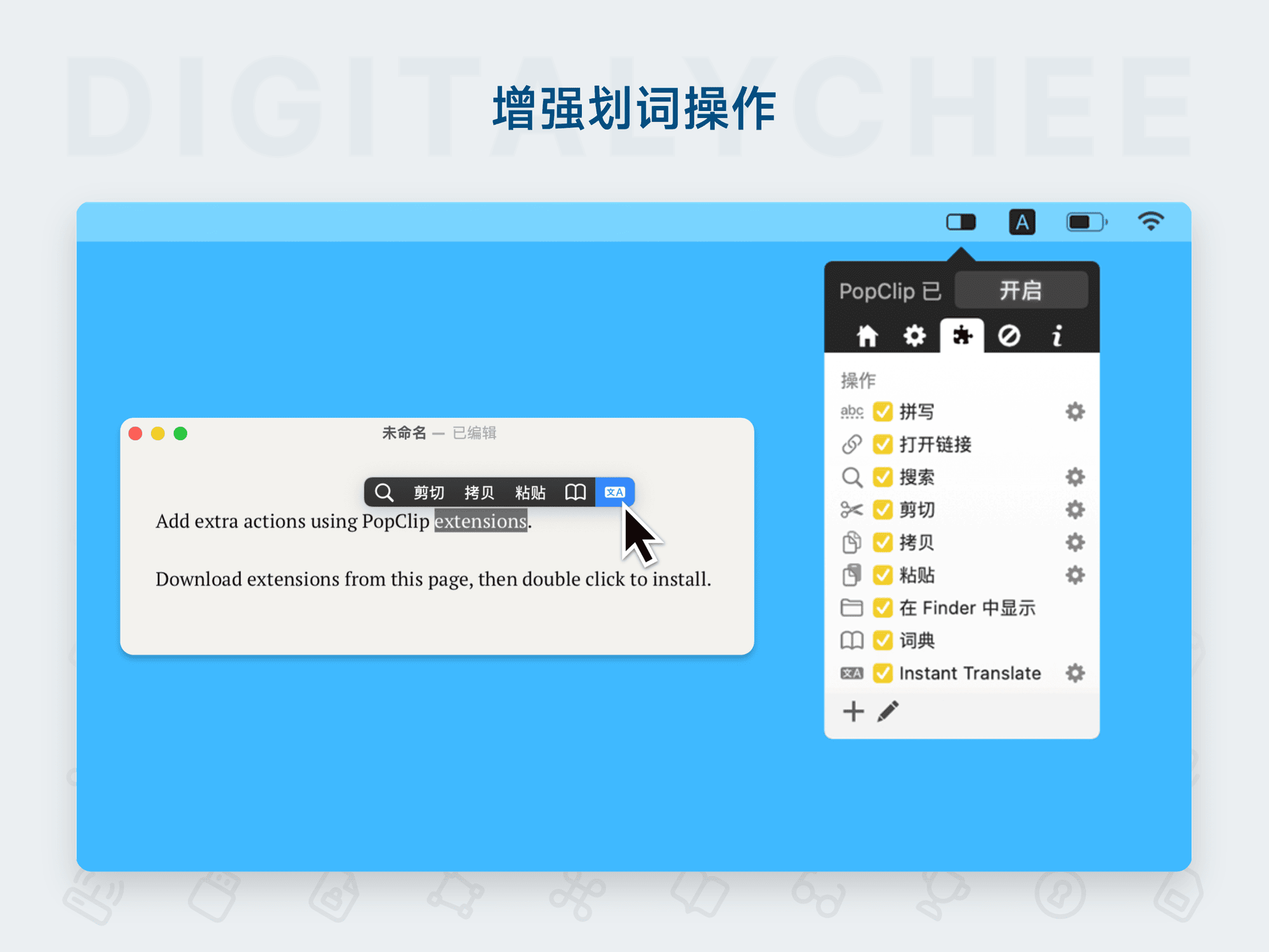
PopClip is a productivity powerhouse designed for macOS. Simply select text to reveal an intelligent quick-action menu, supporting features like text expansion, translation, and search—significantly enhancing everyday text handling efficiency.
PopClip - The Instant Text Operations Power Tool for macOS
Application Overview
PopClip is a revolutionary efficiency tool for macOS that instantly appears when you select text, offering an immediate context menu. Whether you're working in any application, PopClip brings unprecedented convenience to your text workflow.
🌟 Core Features
1. Smart Context Menu
- Instant Appearance: Automatically pops up in any application when text is selected
- Smart Recognition: Matches the most relevant actions based on text content
- Non-intrusive Design: Compact floating menu that doesn’t disrupt your workflow
2. Multifunctional Text Processing Toolbox
- Basic Operations: Copy, cut, paste, delete
- Search Functionality: One-click search for selected text (supports Google, Baidu, Wikipedia, etc.)
- Format Conversion: Case conversion, spell check, encoding/decoding
- Time Management: Quickly create calendar events or to-do items
- Mathematical Calculations: Instant evaluation of selected math expressions
3. Rich Extension Ecosystem
- Official Extension Library: Includes hundreds of carefully designed extensions
- Custom Extensions: Supports users creating personalized extensions
- Developer-Friendly: Provides complete documentation and tools for extension development
4. Multilingual Support
- Translation: Real-time translation in over 100 languages
- Dictionary Lookup: Quick access to word definitions and synonyms
- Language Learning: Aids in learning and mastering foreign vocabulary
🚀 Key Advantages
⚡ Increased Efficiency
- Time Saving: Reduces multi-step operations to a single click
- Reduced Interruptions: Completes complex tasks without switching applications
- Workflow Optimization: Automates repetitive text processing tasks
🎯 Highly Customizable
- Personalized Configuration: Customize menu options based on usage habits
- Extension Combinations: Freely mix and match extensions to build your own workflow
- Appearance Customization: Customize menu style, size, and position
🔄 Seamless Integration
- Broad Compatibility: Works with nearly all macOS applications
- Sync Capabilities: Settings and extensions sync via iCloud
- Keyboard Shortcut Support: Perfectly integrates with system shortcuts
💰 Flexible Licensing Options
- Free Trial: Full-featured trial version available
- Standalone Version: Purchase directly from official website with ongoing updates
- Migration Support: Mac App Store users can migrate to standalone version for free
🛠️ Technical Highlights
Performance
- Lightweight & Efficient: Minimal memory usage, fast response
- Stable & Reliable: Highly polished after years of iteration, very low bug rate
- Resource-Friendly: Minimal impact on system performance
Security
- Privacy Protection: All text processing occurs locally
- Controlled Permissions: Each extension’s permissions are independently managed
- Security Audits: All extensions undergo security reviews
📊 Use Cases
👨💻 Programmers
- Code snippet management
- Quick API documentation lookup
- Integrated Git operations
✍️ Content Creators
- Fast text formatting adjustments
- Synonym replacement
- Word count statistics
🔬 Researchers
- Academic citation management
- Data formatting
- Quick note-taking
🌐 Multilingual Users
- Real-time translation
- Multilingual dictionary access
- Language learning assistance
🎮 User Experience
Installation & Setup
- Simple Installation: Drag to Applications folder after download
- Quick Configuration: Detailed onboarding guide upon first run
- Personalization: Customize preferences within minutes
Daily Use
- Intuitive Operation: No learning curve, easy to pick up naturally
- Growth Through Extensions: Functionality expands as you add more extensions
- Habit Formation: Quickly becomes an indispensable productivity tool
📈 Version Information
- Latest Version: 2025.9.2 (Standalone)
- MAS Version: 2023.9 (Last updated version)
- Update Policy: Standalone version receives continuous feature updates and security patches
💡 Usage Tips
- Start with Basics: Master core features before adding extensions
- Customize as Needed: Choose extensions most relevant to your work
- Keep Updated: Stay on the latest version for optimal experience
- Engage with Community: Join user forums to share tips and tricks
🔗 How to Obtain
- Free Trial: Full-featured trial available on official website
- Purchase License: One-time payment for permanent use (includes free updates)
Summary: PopClip is more than just a tool — it’s a productivity revolution within the macOS ecosystem. It transforms ordinary text selection into a powerful action gateway, making every text interaction full of possibilities. Whether you're a power user or casual user, PopClip significantly enhances your workflow efficiency and enjoyment.
All software data on this site is synchronized from the Awesome mac project. Copyright belongs to original authors.
Recommended Apps

Yippy
Yippy is a free and open-source macOS clipboard history manager that automatically records all copied content, supporting quick search, favorites, and customizable shortcuts to enhance clipboard efficiency.
CleanClip
CleanClip is a smart clipboard management tool for macOS that automatically cleans up paste text formatting, supports content extraction and conversion, making cross-platform content sharing more efficient and organized.

ClipMenu
ClipMenu is an efficient macOS clipboard management tool that effortlessly records and quickly accesses clipboard history, supporting multiple formats such as text and images, making copy and paste operations more convenient.

Clipy
Clipy is a powerful and minimalist macOS clipboard history manager. It helps you quickly access all previously copied text, images, and files, supports custom snippets and keyboard shortcuts, making everyday copy-paste tasks more efficient and intelligent.

Copi
Copi is a macOS clipboard enhancement tool that records clipboard history, stores frequently used text snippets, and supports quick access and keyboard shortcuts, significantly improving text processing and work efficiency.

CopyQ
CopyQ is a powerful clipboard manager that supports recording and editing clipboard history, offering multi-clipboard functionality to efficiently manage and batch-use copied text and data, making it an essential tool for improving work efficiency.
Comments