Directory
Developer Zone
Design & Creativity
Productivity
Other Utilities
Others

Cmd Markdown
Cmd Markdown is a powerful professional Markdown editor that delivers an exceptional writing experience. It supports real-time preview, mind mapping, code highlighting, and cloud synchronization, making it an ideal knowledge management tool for writers and programmers.
Cmd Markdown: A Professional & Efficient macOS Markdown Editor
Application Overview
Cmd Markdown is a professional-grade Markdown editor specifically designed for macOS, developed by "Zuoye Buluo" (Homework Tribe). It aims to provide users with a “more convenient and efficient” tool for capturing ideas, organizing notes and knowledge, and sharing their insights with others. With powerful editing features, a smooth writing experience, and deep support for modern writing needs, it has become a preferred tool for programmers, writers, scholars, and knowledge workers.
Core Features & Advantages
1. Immersive Professional Writing Experience
- Efficient Keyboard Navigation: Deeply optimized keybindings allow all common operations to be performed via keyboard shortcuts, enabling you to focus entirely on content creation.
- Real-time Preview: Supports split-screen real-time preview (WYSIWYG) or pure editing mode for an uninterrupted, fluid writing experience with excellent responsiveness.
- Offline Access: The macOS universal client allows you to create and edit documents anytime, anywhere, without requiring an internet connection.
2. Comprehensive Document Support
Beyond basic Markdown, Cmd Markdown extends writing capabilities into professional domains:
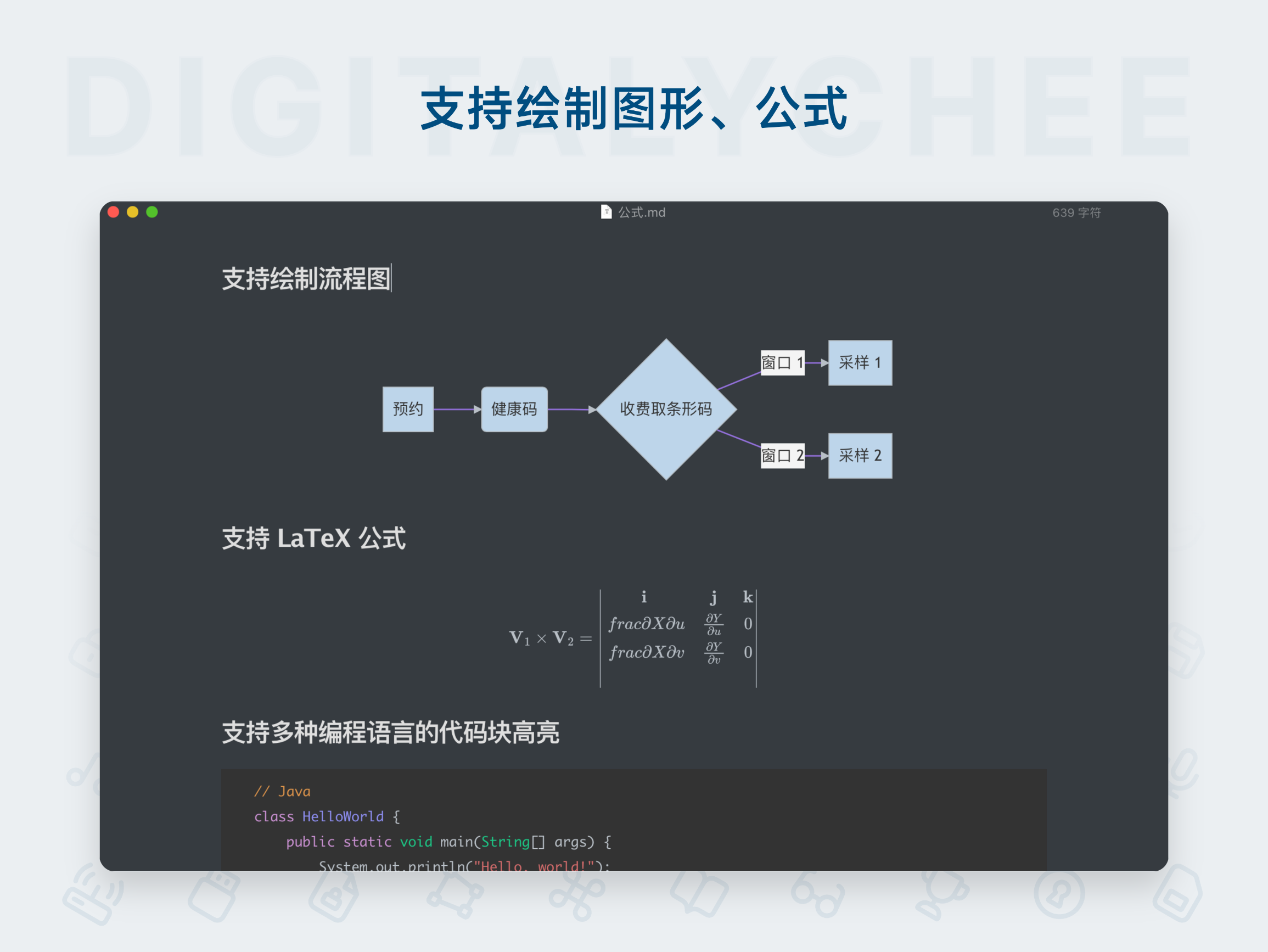
- LaTeX Mathematical Formulas: Natively supports and accurately renders LaTeX math formulas, including equation numbering—ideal for academic papers and technical documentation.
- 19 Professional Chart Types: Using built-in syntax, you can create charts without switching tools:
- Flowcharts, Sequence Diagrams: For illustrating algorithms and program logic.
- Gantt Charts: For project management and scheduling.
- Mind Maps: For organizing thoughts and knowledge structures.
- Plus other visuals like pie charts, line graphs, and more.
3. AI-Powered Smart Writing Assistant
- Integrated with advanced large language models, offering AI-assisted writing features such as idea generation, continuation, polishing, and translation.
- Supports switching between different large models to meet diverse writing scenarios, significantly boosting productivity.
4. Deep Integration for Vim Users
- Includes a detailed Vim tutorial and provides full support for Vim editing mode. Users accustomed to Vim’s efficiency can seamlessly migrate and enjoy the ultimate productivity by combining “the editor of gods” with Markdown.
5. Integrated Knowledge Management
- Cloud Sync: All documents are securely stored in the cloud, enabling seamless access across devices.
- Publishing & Sharing: One-click document-to-link generation for easy sharing and distribution. Beautifully formatted, print-ready layouts.
- To-Do Lists: Built-in Todo list syntax for efficient task management and personal planning.
6. Exceptional Code Support
- Supports syntax highlighting for over 80 programming languages, making it the perfect note-taking tool for technical bloggers and developers.
- Clean, well-structured code blocks ideal for demonstrating and explaining code.
Use Cases
- Learning & Note-taking: Organize class notes, reading reflections, and build personal knowledge bases.
- Technical Writing: Write blogs, technical documentation, API references—with full support for code snippets.
- Content Creation: Publish diaries, essays, and commentary articles.
- Academic Research: Author academic papers with complex formulas and citations.
- Project Management: Use Gantt charts and flowcharts for planning and task decomposition.
- Brainstorming: Use mind maps to quickly capture and organize ideas.
Get Started
Conclusion
Cmd Markdown transcends typical text editors by deeply integrating the elegant simplicity of Markdown with powerful, modern productivity features—such as AI writing assistance, professional charts, LaTeX support, and Vim mode. It’s not just a “writing tool,” but a professional workspace designed to enhance thinking and knowledge production efficiency. For macOS users seeking smooth writing, expressive document formatting, and efficient knowledge management, Cmd Markdown is a highly worthwhile choice.
All software data on this site is synchronized from the Awesome mac project. Copyright belongs to original authors.
Recommended Apps
Effie
Effie is a creative tool that integrates writing and mind mapping, supporting Markdown syntax and offering a clean, distraction-free writing environment to help creators focus on content creation and achieve efficient output.

EME
EME is an elegant open-source Markdown editor designed specifically for developers. Featuring real-time preview, code syntax highlighting, and cross-platform support, it delivers a clean and efficient writing experience.

iA Writer
iA Writer is an elegant and minimalist Markdown writing tool that offers a distraction-free writing environment, featuring grammar checking and cross-platform synchronization, empowering both creative and professional writing.

Joplin
Joplin is an open-source, free cross-platform note-taking application that supports Markdown editing and end-to-end encrypted synchronization. It seamlessly works across Windows, macOS, Linux, iOS, and Android, making it your ideal knowledge management tool.
LightPaper
LightPaper is a powerful Markdown editor featuring real-time preview, code highlighting, format conversion, and offline writing, meeting the needs of efficient content creation and management.

Marked 2
Marked 2 is a professional Markdown document preview and editing tool that supports real-time preview, multi-format export, and custom styling, helping you write and organize documents more efficiently.
Comments