Directory
Developer Zone
Design & Creativity
Productivity
Other Utilities
Others
Marxico
Marxico is a professional Markdown editor specifically designed for Evernote, supporting real-time preview, offline editing, and code highlighting, making writing and knowledge management more efficient and seamless.
Marxico - Marxico: A Markdown Editor Specifically Designed for Evernote
App Name: Marxico (Mark Feixiang)
App Type: Markdown Editor / Productivity Tool
Platforms Supported: macOS (desktop client), Windows, Web (Chrome App, mobile browsers)
Core Positioning: A professional editor that deeply integrates the elegant and efficient experience of Markdown writing with Evernote’s powerful storage and organization capabilities.
Overview
Marxico (Mark Feixiang) is a professional editor created specifically to solve the collaboration pain points between Markdown users and Evernote. It is not an independent note-taking application, but rather a refined bridge that enables users to write using pure Markdown syntax and seamlessly save content to Evernote, achieving the ideal workflow: “Write in Markdown, Store in Evernote.”
Core Features and Advantages
1. Full-featured Markdown Support for Professional Writing
Marxico supports not only basic Markdown syntax (headings, lists, bold, italics, links, etc.) but also integrates advanced features ideal for technical documentation, academic writing, and daily note-taking:
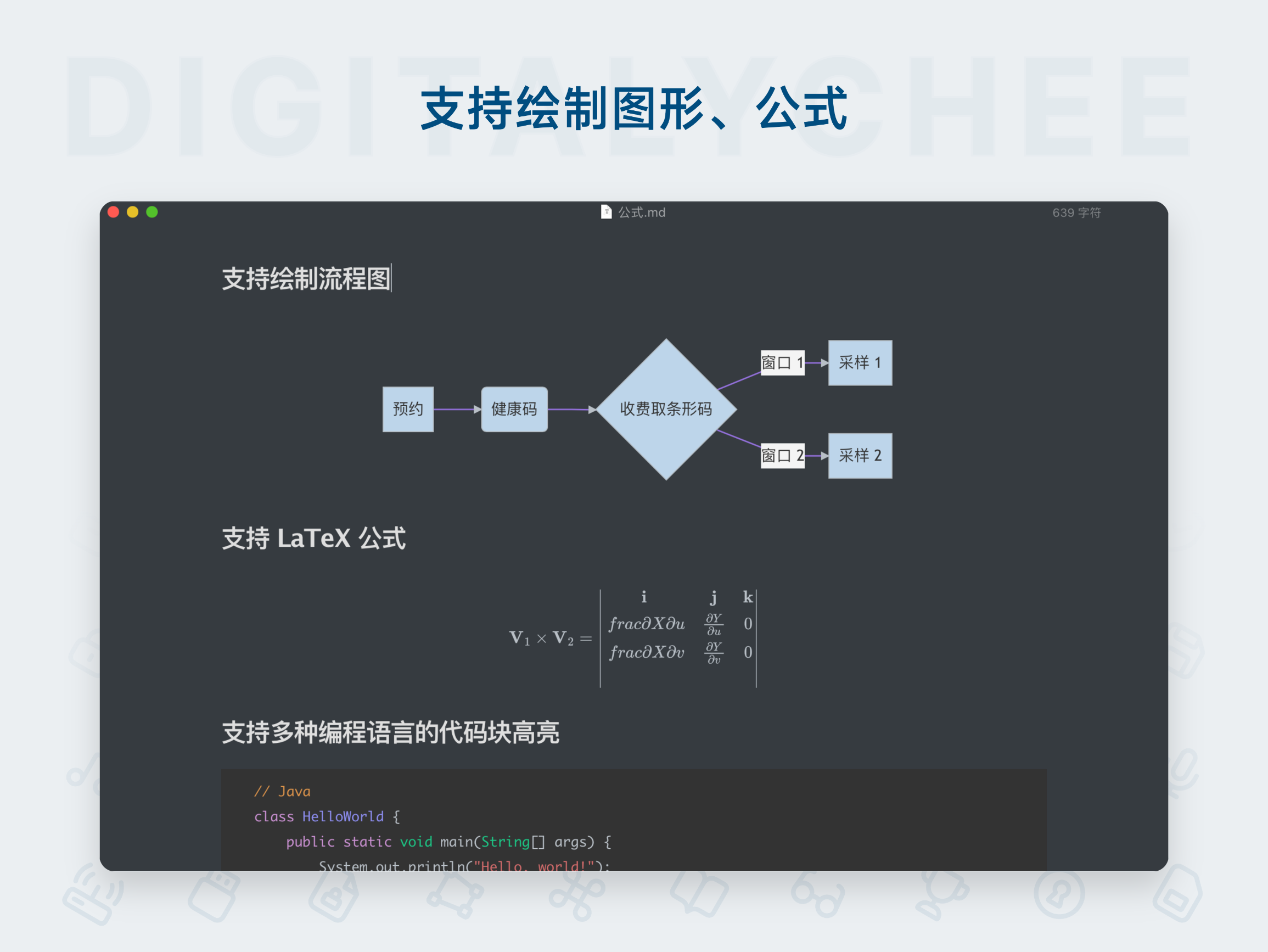
- Code Syntax Highlighting: Supports syntax highlighting for multiple programming languages, making code blocks clear and readable.
- LaTeX Mathematical Formulas: Fully supports inline and block-level math formula rendering, meeting the needs of STEM users and students.
- Flowcharts and Sequence Diagrams: Generate flowcharts and sequence diagrams directly using simple text syntax, useful for designing processes and system architectures.
- Tables: Easily create and manage structured data tables.
- To-Do Checklists: Create task lists using
- [ ]syntax, improving task management efficiency (requires editing within Marxico to sync status).
2. Deep Integration with Evernote
This is Marxico’s most significant differentiator from other Markdown editors.
- Bidirectional Editing & Smart Storage: Marxico saves Markdown source code as hidden content within Evernote. This means you can edit in Marxico using Markdown syntax while viewing the rendered rich text in Evernote. Better yet, you can click “Edit” directly from an Evernote note to return to Marxico for Markdown editing — enabling true bidirectional flow, not just one-way export.
- Notebook and Tag Selection: Use
@(Notebook)[Tag1|Tag2]syntax during editing to specify the Evernote notebook and tags for saving, offering convenient organization. - Automatic Title Extraction: Automatically extracts the first heading in the document as the title for the Evernote note.
- Offline Chrome App: Provides a Chrome app version for offline use, offering an experience similar to a native desktop client.
3. Focused and Efficient Writing Experience
- Real-time Preview: Classic dual-pane layout with Markdown source on the left and real-time rendered preview on the right, providing intuitive and smooth writing.
- Rich Keyboard Shortcuts: Offers full keyboard shortcuts (e.g.,
Ctrl+Sto sync,Ctrl+Bfor bold) and supports Vim/Emacs editing modes, catering to advanced users’ efficiency needs. - Customizable Settings: Allows users to customize editor font, font size, and CSS styles for a personalized, comfortable writing environment.
- Local Cache & Auto-save: Uses browser local storage to ensure content is preserved even during network interruptions.
4. Cross-platform Sync and Data Security
- Clear Data Ownership: All notes are ultimately stored in your Evernote account. Marxico’s servers only handle API calls and format conversion — no raw user note data is stored on Marxico servers, ensuring privacy and security by design.
- Multi-device Access: Accessible via web browser on any device (including iPads and other mobile devices), complementing macOS/Windows desktop clients for a seamless cross-platform writing experience.
Key Advantages Summary
- Solves Core Pain Points: Perfectly serves users who appreciate Markdown’s simplicity and efficiency while relying on Evernote’s powerful organization and sync features.
- Enhanced Professional Writing: Advanced support for code, formulas, and diagrams makes it a top choice for programmers, students, researchers, and technical writers.
- Seamless Workflow Integration: Deep integration enables a closed-loop “edit-save-re-edit” process, fully embedding Markdown notes into the Evernote ecosystem without needing constant imports/exports.
- Well-Designed, Focused Experience: The editor features a clean interface focused purely on writing, minimizing distractions and boosting productivity.
Note:
- Marxico operates on a subscription model. New users receive a trial period; after that, a paid subscription is required to continue using sync features.
- To maintain data consistency, any edits made to a note directly within the Evernote app must be synchronized back to the Markdown source in Marxico.
In summary, Marxico (Mark Feixiang) is one of the best tools bridging the free-form writing world of Markdown with the structured knowledge base of Evernote. Through elegant technical implementation and user-centric design, it provides an irreplaceable solution for users who value both efficiency and elegance in their note-taking experience.
All software data on this site is synchronized from the Awesome mac project. Copyright belongs to original authors.
Recommended Apps

Wise Words
Miaoyan is an elegant and minimalist Markdown editor for Mac, featuring real-time preview and code highlighting, offering a focused writing environment. It is the ideal choice for programmers and writers alike.
MWeb
MWeb is a professional Markdown editor that integrates writing, note management, and blog publishing. It supports multiple image hosting services, code highlighting, and static blog generation, making it an efficient writing tool for knowledge workers and developers.

Obsidian
Obsidian is a powerful personal knowledge management tool that uses a local-first, plain-text Markdown note-taking system. It supports bidirectional linking to build a knowledge graph, helping you efficiently connect ideas and create your own personalized "second brain.

Typora
Typora is a revolutionary Markdown editor that introduces a seamless real-time preview "what you see is what you get" editing mode. It offers a clean, distraction-free writing interface with full support for tables, code highlighting, mathematical formulas, and other rich features, allowing you to focus entirely on content creation.

Ulysses
Ulysses is a professional writing app awarded the Apple Design Award, designed specifically for Mac, iPad, and iPhone. It offers a distraction-free writing environment, powerful project management, multilingual grammar checking, and one-click publishing to blogs or exporting in formats such as e-books and PDFs. It is the ideal choice for writers, bloggers, and content creators.

Yu Writer
Yu Writer is a well-designed cross-platform Markdown editor featuring an elegant and minimalist interface with real-time preview. It supports three-panel view, document library management, and customizable themes, delivering a clean and efficient writing experience for creators.
Comments