Directory
Developer Zone
Design & Creativity
Productivity
Other Utilities
Others

Yu Writer
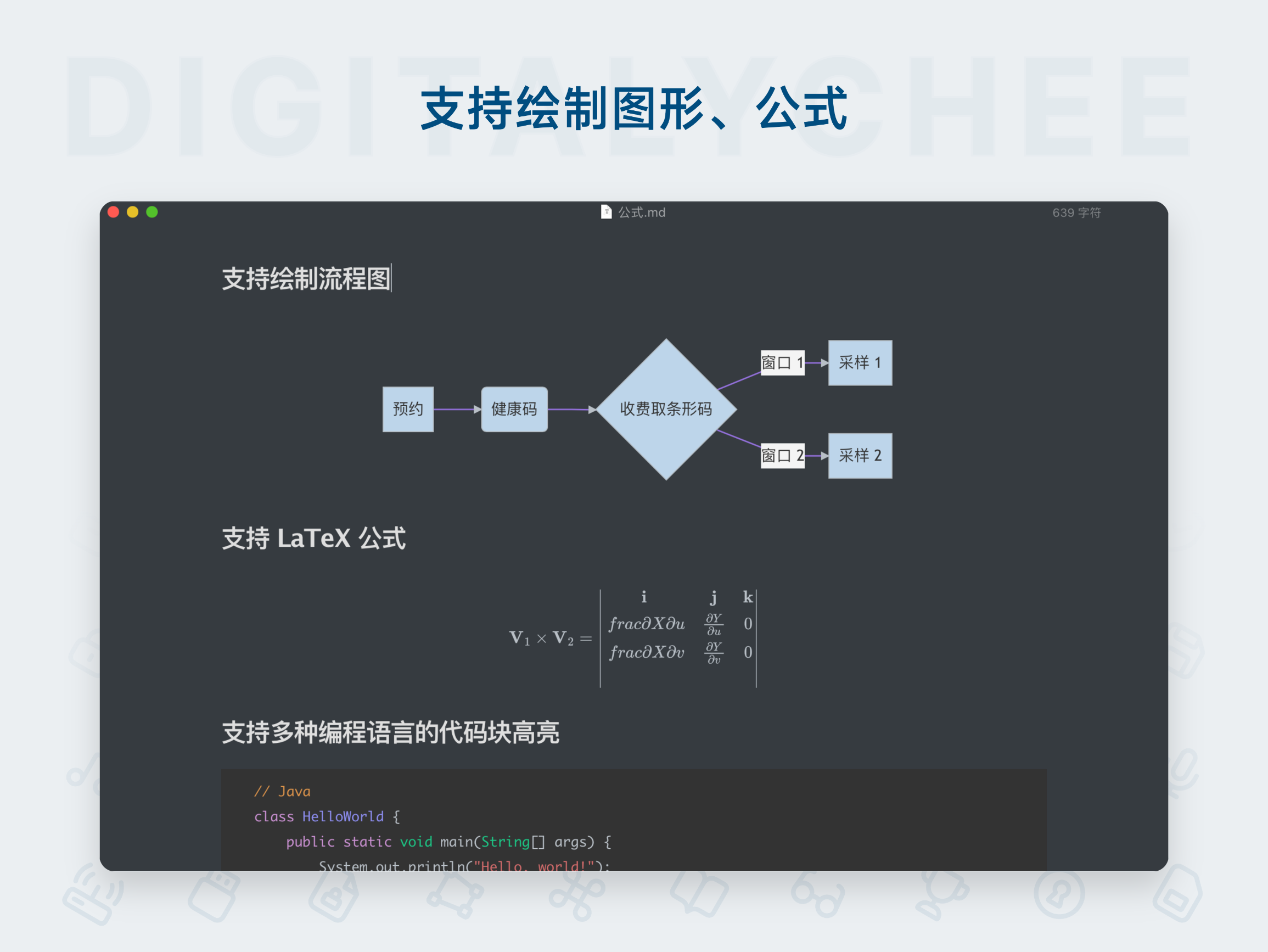
Yu Writer is a well-designed cross-platform Markdown editor featuring an elegant and minimalist interface with real-time preview. It supports three-panel view, document library management, and customizable themes, delivering a clean and efficient writing experience for creators.
Yu Writer: An Efficient and Elegant Cross-Platform Markdown Editor
Yu Writer is a well-designed, writing-focused Markdown text editor. It aims to provide creators who value efficiency and visual comfort with a clean, powerful, and intuitive writing environment.
Get Started Now: Latest Beta Version (v0.5.3) Download Links:
- Linux: Coming soon
Features
Native Application Experience
- Built with web technologies, yet delivers smooth performance and a native-like interface on macOS, deeply integrated with the operating system for fast startup and efficient operation.
Elegant and Minimalist Interface
- Features an IDE-style layout with a three-pane view (Document Library, Document Outline, Editor/Preview), ensuring intuitive and efficient workflow. Modern and clean design with support for light/dark themes, customizable editor fonts and line height. Focus mode highlights the current paragraph, significantly reducing visual fatigue.
Real-time Preview & Seamless Editing
- Offers WYSIWYG editing experience. As you type Markdown syntax, the preview pane or editing area instantly renders the final output. Inline rendering mode allows plain text and formatted elements to coexist harmoniously, ensuring a natural and fluid editing process.
Powerful Document Management
- Includes a built-in document library manager that supports creating “workspaces” to categorize and manage documents by project or type, making organization and quick retrieval effortless. Documents are saved as single files, facilitating backup and sharing.
Rich Markdown Support
- Supports standard Markdown syntax (CommonMark, GFM) and extends it with tables, footnotes, strikethrough, and task lists. Supports mathematical formulas (TeX/LaTeX) and diagram rendering (Mermaid) for flowcharts and sequence diagrams, meeting technical writing needs.
Focus Mode & Writing Assistance
- Offers one-click focus mode (highlighting current line or paragraph) to eliminate distractions. Includes word count, estimated reading time, and other tools to help authors track progress.
Cross-Platform Sync
- Enables seamless document syncing across devices via cloud storage (e.g., Dropbox) or local folder synchronization, allowing you to continue writing anytime, anywhere.
Multi-Format Export
- Supports exporting documents to PDF, HTML, Word, and other formats for easy publishing and sharing.
Advantages
- Designed for Writing: Features are centered around the core purpose of writing, avoiding unnecessary bells and whistles. The clean interface allows creators to quickly immerse themselves in content creation.
- Efficiency Meets Aesthetics: Combines powerful editing capabilities with a visually pleasing and smooth user experience, enhancing long-term writing enjoyment.
- Local First Benefits: As a locally stored single-file application (not a web wrapper), it offers better privacy and data security, faster startup and response, and no network dependency.
- Balanced Professionalism: Suitable for Markdown beginners due to its intuitive interface and real-time preview, which lowers the learning curve;同时也 ideal for advanced users with features like diagram and formula support.
- Active Development: Maintained by an independent developer who continuously updates and refines the app based on user feedback.
In summary, Yu Writer is an excellent choice for authors, programmers, scholars, and students who love Markdown, value both aesthetics and efficiency in their writing tools, and need to switch between macOS/Windows platforms. Its Pro version offers additional advanced features, making it a great option for users seeking an ultimate writing experience.
All software data on this site is synchronized from the Awesome mac project. Copyright belongs to original authors.
Recommended Apps
Zettlr
Zettlr is a free and open-source Markdown editor designed specifically for academic writing and knowledge management. It integrates project management, reference support (Zotero), Zettelkasten note-taking methodology, and multiple format outputs, serving as an efficient writing workspace for scholars and researchers.

Cmd Markdown
Cmd Markdown is a powerful professional Markdown editor that delivers an exceptional writing experience. It supports real-time preview, mind mapping, code highlighting, and cloud synchronization, making it an ideal knowledge management tool for writers and programmers.
Effie
Effie is a creative tool that integrates writing and mind mapping, supporting Markdown syntax and offering a clean, distraction-free writing environment to help creators focus on content creation and achieve efficient output.

EME
EME is an elegant open-source Markdown editor designed specifically for developers. Featuring real-time preview, code syntax highlighting, and cross-platform support, it delivers a clean and efficient writing experience.

iA Writer
iA Writer is an elegant and minimalist Markdown writing tool that offers a distraction-free writing environment, featuring grammar checking and cross-platform synchronization, empowering both creative and professional writing.

Joplin
Joplin is an open-source, free cross-platform note-taking application that supports Markdown editing and end-to-end encrypted synchronization. It seamlessly works across Windows, macOS, Linux, iOS, and Android, making it your ideal knowledge management tool.
Comments